Print a WhatsApp chat: every message and every voice message, on paper
WhatsApp has no button for printing a chat. Export the chat, upload the file here and you get one PDF laid out for printing: every message with its number, date, time and sender, every voice message written out where it was sent, and photos in place. Chats of up to 150 messages are free in full; for longer ones the first messages are free to look at and the whole chat is $5, paid once.
- One PDF of the whole chat, grouped by day, ready to print
- Every message numbered, with date, time and sender as in the export
- Voice messages written out word for word, so they are on paper too
- Photos shown where they were sent, videos as a still frame
- Up to 10,000 messages for one payment of $5
12 March 2024
RECEIPT
Deposit$300.00
Paid12/03/24
This is the receipt 15:01
WhatsApp conversation record
Priya Verma
Participants: Rahul Sharma, Priya Verma · Period: 12/03/2024 14:20:11 to 15/03/2024 08:20:00
Voice message · 0:07 · 00000004-AUDIO-2024-03-12-14-25-10.opus · Hindi
नमस्ते राहुल, मैं कल सुबह 10:00 बजे ऑफिस पहुँचूँगी। कृपया किराए का एग्रीमेंट साथ लेकर आना।
ENGLISH Hello Rahul, I will reach the office tomorrow at 10:00 am. Please bring the rent agreement with you.
Ok 👍
[photo: 00000007-PHOTO-2024-03-12-15-01-00.jpg] This is the receipt
Source SHA-256 fd6d45b23d8ec7a02d11b…
WhatsApp is a trademark of WhatsApp LLC. NoCutoff is an independent tool and is not affiliated with WhatsApp or Meta. The chat above is a demo; the PDF excerpt is real output from that demo chat.
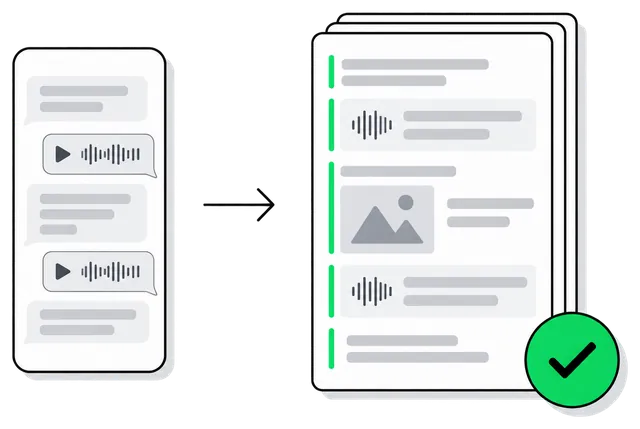
Why printing from the phone falls short
Screenshots are fine for a few messages, but a long chat turns into dozens of images, some without a date and with gaps between them. The text file WhatsApp exports can be printed, but it is a bare list of lines, and every voice message in it is only a file name such as PTT-20261014-WA0012.opus.
Most people who need a chat on paper need it for someone else: a lawyer, a court, an employer, an insurer or a relative. That reader needs all of it, in order, including what was said in the voice messages.
What the printout looks like
A cover page names the people in the chat, the period it covers and the export file it was made from, with the SHA-256 fingerprint of that file. The messages follow day by day. Each voice message sits in a box at the point it was sent, with its length and the words that were said.
If you only need part of the chat, choose a period or leave out single messages before you download; the remaining messages keep their original numbers. The same content also comes as TXT and as a CSV spreadsheet.
Getting the chat out of WhatsApp
- iPhone: open the chat, tap its name at the top, then Export chat and Attach media
- Android: open the chat, tap ⋮, then More, Export chat and Include media
- Upload the file WhatsApp creates; on Android you can also upload the .txt together with its voice notes and photos
- Pick the export with media, otherwise the voice messages cannot be written out
How the tool works, what it costs and how your files are handled is on the WhatsApp Chat to PDF page; prices for every tool are on the pricing page.
Last updated
Questions and answers
Can I print a WhatsApp chat without exporting it?
Only as screenshots or by copying messages one at a time. The export is the only way WhatsApp gives you the whole chat with its dates, and it takes about a minute.
Are photos in the printout?
Yes. Photos and stickers appear where they were sent, videos as a still frame with their length, and documents and contact cards are listed by name.
How much does it cost?
A chat of up to 150 messages, with up to 5 minutes of voice messages, is free in full. For a longer chat the first messages are free to look at and the whole chat is $5, paid once, for up to 10,000 messages. There is no subscription.
Who can see my chat?
Only you can open the job. Voice messages are sent to an AI model provider only to be written out and are not used to train models. Jobs started without an account are deleted after 7 days, and you can delete a job at any time.